
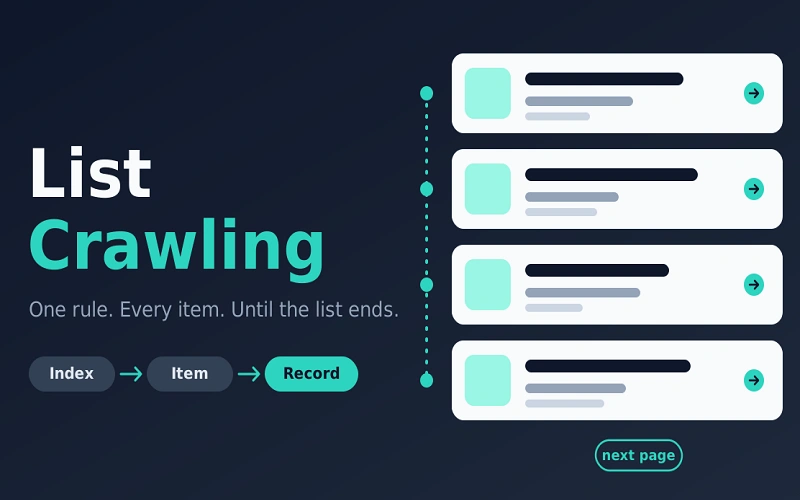
List crawling is the job of reading pages that repeat the same kind of item, then saving one record for each item. A category grid, a job board, a city directory, a search-results page: the cards share a shape. Title, price, place, rating, and a link. A list crawler applies one rule to every card and follows the list until it ends.
That is the whole idea. The listing page is an index. It is not the record. The fields you actually want often sit one click deeper, on the item page.
If you are new to this, ignore the tool ads for a minute. You do not need a stack of software to understand the job. You need to know what you are collecting, where the list continues, and when you should not run it.
A list crawler is not a site spider
People mix the words, so the first crawl goes wrong.
A crawl is one run. A crawler is the program that does the visiting. A spider is the same idea under an older name. Fetching is one request for one URL. Parsing is reading fields out of the page that came back. Scraping usually means that parsing step, or the whole job of turning pages into a table.
Web crawling, in the broad sense, starts at a seed URL and follows links to see what a site contains. Search engines do this. So do site audits. List crawling is narrower. You stay inside one directory, one query, or one category. You do not wander the domain hoping the right pages turn up.
There is a second meaning, mostly in SEO work. Someone already has the URLs, from a sitemap or a redirect map, and asks a crawler to fetch that set and nothing else. No link following. That is a URL-list audit. It is useful after a migration. It is a different job from walking a category page. This guide is about the first job: the site keeps the index, and you copy its membership.
Where list crawling fits
It fits sites that are really a database with a public front. Product catalogs. Job boards. Property listings. Review blocks. Local directories. Search results. The publisher already grouped the items. That is why a list crawl is cleaner than a spider that follows every link in the footer.
It fits badly when the items are not siblings. A news article and a login wall do not share a card. It also fits badly when the publisher already offers an API, a CSV, or a partner feed. That file is the list, already structured, and it survives a redesign that would break a selector. Check for it before you write a crawler. A crawler is the fallback, not the prize.
How a reliable list crawl is shaped
Name three things before the first request. The entity: one product, one job, one business. The fields, and which of them may be empty. The population: this category, this city, this query, not the whole internet.
Then open the list in a normal browser. Is the card already the record, or only a link to a detail page? Is the next page a real URL, a parameter such as page or offset, a button that works only after scripts run, or an infinite scroll? Do filters create a new list? Does robots.txt or the terms say this path is not for automated clients?
The reliable shape is two phases.
Phase one collects every item URL, once. Start at the first listing URL. Parse the item links. Record the next-page URL if the page states one. Stop when the next page is missing, repeats a page you already have, or comes back empty. Deduplicate as you go. Category pages overlap, and related modules leak links from outside the list. Keep the listing URL that produced each item, so a gap later can be traced.
Count is the test. If the site says 214 results and you stored 90 URLs, you did not finish. A pager that starts at zero, a last page that repeats the first, a filter that was on in the browser but not in the request, or items that appear only after JavaScript runs will all short the file.
Phase two is one fetch per item URL, with the same field map each time. Prefer a stable id the publisher already uses, a SKU or a job id, over a title. Titles change. Store the fetch time and the HTTP status. A 404 is data: the item left the list. A block page is not a record. Do not parse a challenge page and call the result a price.
Space the requests. A long list fetched as fast as the pipe allows is how small sites fall over. Retry only temporary failures, and cap the retries.
Pagination is where most first crawls fail
Numbered pages are the old pattern. Page 2 is its own URL. Follow it. Some sites start at page 0. Some repeat the last page forever.
A next link should be followed until it disappears, and dropped if the URL repeats. A next control that is only a button, with no href, is not this pattern.
Offset, limit, and cursor parameters are windows. offset=40 and limit=20 means skip 40, return 20. If you can see the parameter change as you page, you can usually request each window directly. Do not invent parameters the site does not use.
Load more and infinite scroll often hide a real next page or a background request. Scroll position is not a count. If the items vanish with scripts disabled, a plain HTML fetch will under-count.
A brand facet or a city facet is a new list. Crawl it as its own index if you need it, and deduplicate items that appear in more than one.
What “done” looks like
The output is a table or a set of JSON objects, one per entity, not a folder of HTML. A useful row has the source URL, the stable id, the fields you named, and the time you observed them. Drop rows whose required fields are empty. If the job runs again tomorrow, diff it. New items, missing items, and changed prices are the product. Alert on a sudden drop in item count before you alert on one missing field. Selectors drift when a front end is redesigned.
Read this before you run one
A page you can open is not automatically a page you may copy in bulk. robots.txt, described in RFC 9309, is a request to crawlers, not an authorization system. Read it anyway. Match your user-agent. Refresh it on a long job. Terms, copyright, and privacy law are separate questions.
In the United States, hiQ Labs v. LinkedIn held that the Computer Fraud and Abuse Act does not, by itself, cover reading public pages that need no login. That ruling is not a permission slip. In the European Union, names, emails, and phone numbers are personal data even on a public page.
List crawling, as this site uses the term, is not a way to take data from behind a login or build a contact list from harvested addresses. Public business facts are the ordinary subject: a shop name, a published price, a job title on an open board.
A short checklist
Find an official file first. Name the entity and the fields. Confirm the list continues, and how. Collect every item URL once. Read each record once. Store the time and the status. Stop when the publisher has said no.
Pingback: List Crawling vs Web Crawling: Which Job Are You Running?